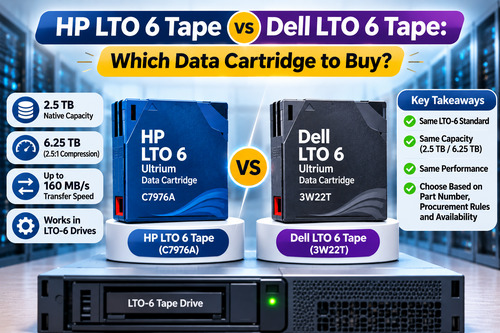
The HP LTO 6 tape is a data cartridge that stores 2.5 TB of native data, or up to 6.25 TB with 2.5:1 compression. It is built for backup and long-term archiving, and it works in any compatible LTO-6 drive.
The Dell LTO 6 tape offers the same 2.5 TB native capacity, because both cartridges follow the LTO-6 standard. The real choice comes down to part numbers, procurement rules and availability, not performance. This guide explains how the two compare, which drives accept them and how to store them safely.
What Is an LTO-6 Data Cartridge?
An LTO-6 data cartridge is a magnetic tape cartridge built to the sixth generation of the Linear Tape-Open (LTO) standard. It is designed for backup and long-term archiving. Each cartridge holds 2.5 TB of native capacity and supports a native transfer speed of up to 160 MB/s in a compatible drive. LTO-6 also supports hardware encryption and LTFS, which lets you treat a cartridge like a removable file system.
Cartridges are removable, so you can keep them offline. A tape on a shelf cannot be reached by ransomware that spreads across your network, which is one reason tape still has a place next to disk and cloud.
LTO-6 Cartridge Specifications Compared
Here is how the two cartridges compare in practice.
The HP LTO 6 tape carries part number C7976A. It is the right reference if your drive, library or support documents list HP part numbers.
The Dell LTO 6 tape carries part number 3W22T. It is the right reference if your support documents or purchase rules list Dell part numbers.
Apart from the part number, the specifications are the same:
- Native capacity: 2.5 TB
- Compressed capacity (2.5:1): 6.25 TB
- Native speed: up to 160 MB/s in a compatible drive
- Works in: LTO-6 drives
The specifications match because the LTO standard defines the format, not the brand name on the label.
Are HP and Dell LTO-6 Cartridges Interchangeable?
Short answer: in most cases, yes. The LTO Program defines the cartridge format, so a cartridge that meets the LTO-6 standard should be readable and writable by any LTO-6 drive, whichever brand sold it. The exception is an environment that lists only certified media in its support terms. If that applies to you, confirm with your drive or library vendor before you order.
Which Drives Can Use LTO-6 Cartridges?
LTO-6 drives read and write LTO-6 cartridges. Under the LTO specification, an LTO-6 drive can also write LTO-5 cartridges and read LTO-4 cartridges. Newer generations follow stricter rules: LTO-8 and newer drives cannot read LTO-6 cartridges. Check generation compatibility before you upgrade drives, or you may need to restore old data first.
How to Choose Between the Two
Since performance is the same, decide on practical factors:
- Support documents: use the part number that your drive, library or support contract lists.
- Procurement rules: some organisations buy only from an approved part-number list.
- Availability: pick the cartridge that is in stock, because both do the same job.
- Labelling: keep one clear barcode and label scheme, whichever you choose.
If your environment is HP-based, choose the HP LTO 6 tape so the part number matches your records.
If your team already runs Dell tape libraries, a Dell LTO 6 tape is the natural fit. In mixed environments, either cartridge works.
How to Store LTO-6 Cartridges Safely
Good storage protects your data for years. Follow these habits:
- Keep cartridges in a cool, dry place with stable temperature and humidity.
- Store them upright in their cases, away from strong magnetic fields and direct heat.
- Never touch the tape itself, and do not drop a cartridge.
- Clean your drive heads as the manufacturer recommends.
- Test restores regularly, because an untested backup is only an assumption.
Under proper conditions, LTO media is typically rated for around 30 years of archival life.
Common Mistakes to Avoid When Buying LTO-6 Media
- Buying the wrong generation: an LTO-5 or LTO-7 cartridge is not a substitute for LTO-6 in every drive, so always check the generation printed on the label.
- Skipping cleaning cartridges: dirty heads cause errors and shorten drive life.
- Ignoring retention needs: decide how long you must keep data before you size your cartridge stock.
- Leaving old tapes undestroyed: use a certified degausser before you dispose of retired media.
Is LTO-6 Still Worth Buying in 2026?
Yes, if you already run LTO-6 drives and need compatible media. Buying cartridges costs far less than replacing a working library. If you are starting a new project, compare newer generations first, because they hold much more data per cartridge. LTO-10, for example, reaches 30 TB native. For existing LTO-6 environments, though, keeping a healthy stock of matching cartridges is the simplest way to stay protected.
Where to Buy LTO-6 Cartridges in India
KSG Automation is an Indian IT solutions company and IBM storage-media distributor with offices in Gurugram, Delhi, Bangalore and Mumbai. Use the product links in this guide to view both cartridges, and contact us to confirm drive compatibility before you place an order.
About the Author
Our storage specialists have worked with LTO media, tape drives and data-security products since 2011. We write practical, plain-language guides that help IT teams choose, store and protect their backup data.